An Operator Information System for Parallel, Off-line Assembly
|
Jeffrey W. Herrmann |
Edward Lin |
|
Dept. of Mechanical Eng. and Institute for Systems Research |
Institute for Systems Research |
|
University of Maryland |
University of Maryland |
|
College Park, MD 20742 |
College Park, MD 20742 |
|
USA |
USA |
|
Ioannis Minis |
Paul Schneider |
|
Dept. of Mechanical Eng. and Institute for Systems Research |
Black & Decker |
|
University of Maryland |
28712 Glebe Road |
|
College Park, MD 20742 |
Easton, MD 21601 |
|
USA |
USA |
Abstract -
The Black & Decker factory in Easton, Maryland, now produces many model types in small, infrequent production runs. This has motivated the plant to purchase and install parallel, off-line assembly lines that reduce changeover times. However, the production operators are still using work instructions that are hard to find, hard to interpret, and often outdated. The University of Maryland and Black & Decker have developed and implemented an operator information system that supports parallel, off-line assembly. Using this system, Black & Decker personnel create and update easy-to-read paperless work instructions, and each operator workstation automatically retrieves the correct paperless work instructions and displays them. Because the system uses Internet technology, engineers anywhere can view the work instructions.
I. INTRODUCTION
The Black & Decker, Easton, site has transformed itself: once a consumer products manufacturer, Easton now manufactures professional products. This transformation has eliminated large production runs. Instead, Easton now produces many model types in small, infrequent production runs. Faced with increasing product variety, production operators need more accurate information. Currently, they waste too much time and energy seeking information that describes the product they are building. Mistakes can occur when the operators cannot easily access the right information and when they use outdated information. Moreover, operators often have difficulty interpreting engineering drawings.
Black & Decker introduced in late 1996 a new line of professional drills and drivers under the code name NorthStar. The tools carry the brand names DeWalt and Elu. Production operators will assemble more than 150 models of drills using two identical assembly systems constructed by Prodel Automation.
The Prodel assembly systems feature parallel, off-line workstations and belts that propel pallets along tracks from one station to another. Each pallet has a programmable memory and can communicate with the stations via low power radio transmissions. The assembly system has four types of stations: kitting, transmission assembly, final assembly, and unload. At a kitting station, an operator loads an empty pallet with the components that the specific model requires. The station’s Programmable Control Unit (PCU) programs the pallet’s memory with the product code for that model and the operation code for the next operation. (Each station, in turn, changes the operation code.) After kitting a pallet moves to one of the transmission assembly stations, which accept pallets that have the correct operation code. After an operator assembles the transmission, the pallet moves to one of the final assembly stations. After an operator completes the assembly, the pallet mores to the unload stations, where an operator removes the tool, tests it, and sends it to the packing operation along a separate conveyor. The empty pallet returns to a kitting station. These parallel workstations allow longer individual cycle times and increased work content, and different operators can build different models simultaneously.
This new environment brings new information management demands. First, the increased variety of mostly small batches complicates the information management task. In addition, the increased work content of each operator increases the information content of the work instructions.
To respond to this challenge we have constructed an operator information system that uses hardware and software links to display paperless work instructions to operators in real-time. Networked PC’s located on the production floor provide timely and accurate information to the operators. The paperless work instructions are simple, easy-to-read diagrams, not difficult-to-interpret engineering drawings.
The operator information system has two major functions. The first system function allows an engineer to construct and change paperless work instructions. The second system function allows each assembly station to read product and operation information from a pallet, retrieves the corresponding paperless work instructions, and displays them to the operator.
The remainder of this paper is organized as follows: Section 2 reviews related work on work instructions and job aids. Section 3 describes the system architecture. Section 4 discusses the system implementation. Section 5 concludes the paper.
II. RELATED WORK
Although some vendors now offer systems for paperless work instructions, these systems do not meet the requirements for Easton’s parallel assembly workstations, which can switch quickly between different pallets containing different products. Moreover, the assembly system’s pallets can automatically identify their contents. There exist information systems that manage extremely complex work instructions; for example, Eyring’s Assembly Management System (AMS) manages work instruction documents with process standards, workmanship standards, process specifications, defects, parts shortages, temporary process changes, tool problems, video images, and CAD models. Such off-the-shelf systems are extremely expensive. However, Easton does not need such complexity, and these information systems cannot respond automatically to the movement of pallets.
Previous work in ergonomics has addressed issues related to the format of work instructions and the usefulness of job aids. Some ergonomics references [1,5] describe the operational requirements and criteria for information display design (information needed, choice of display type, location and layout, and design details such as typographical features and readability) and principles of workspace design, which includes where to position displays. Other sources [2, 3] suggest that job aids, which can be used for training and during production, can help operators remember critical details and improve performance if they are easy to use. Job aids include procedural instructions and codebooks that condense information, schematic diagrams and flowchart that represent information graphically, checklists, and software help systems.
Fig. 1 shows the system architecture. This architecture comprises two modules: the paperless work instructions software and the operator information system.
The paperless work instructions software allows a manufacturing engineer to generate digital images and combine them with component information to create work instructions for each assembly operation on each product.
Fig. 1 System Architecture
The engineer can add, modify, and delete products in a repository of paperless work instructions.
The operator information system employs, at each assembly workstation, a program that identifies the pallet’s production and operation codes, retrieves from the repository the corresponding paperless work instructions, and displays the work instructions on a CRT.
IV. IMPLEMENTATION
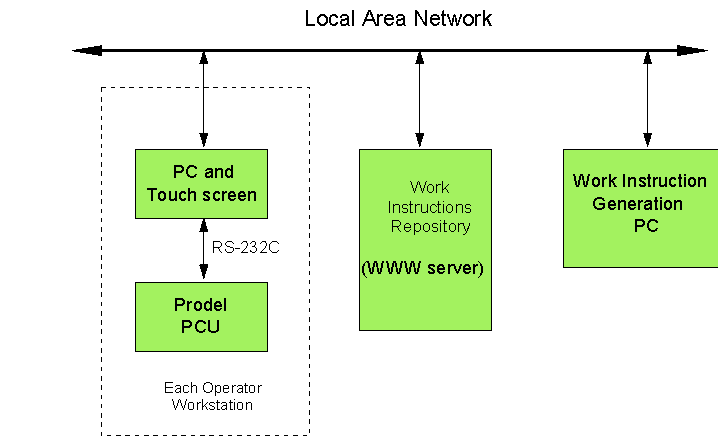
In this section we describe how we implemented the system. Fig. 2 illustrates the hardware architecture, and Fig. 3 shows the work instruction generation (in the bottom half) and the operator information system (in the top half). Along the way we discuss alternatives that we considered but did not choose.
WORK INSTRUCTION GENERATION
The engineer creates images of the product using a digital camera. After loading the image and translating its format, the engineer (on the work instruction generation PC shown in Fig. 2) uses a graphics editing tool to add lines and descriptive text to the image. Black & Decker has chosen Micrographx for this function. After saving the images, the engineer uses authoring software to add the images to work instruction templates, insert appropriate information, and save the work instructions as HTML files that can viewed using a standard World-Wide Web browser. As shown in Fig. 2, a network file server stores the work instructions repository. Black & Decker has chosen FrontPage and Microsoft Internet Explorer for these functions. The HTML files have hyperlinks that connect the multiple pages that form each operation’s work instructions. The first page is an index page that displays the operation’s result and the assembly sequence and has links to pages that explain and illustrate each step.
For some time we considered an approach that would use isometric views that the design engineers CAD software could generate. This approach has two disadvantages, however. One, the drawings were not as realistic or as useful as the high-quality digital photographs. Two, this approach would limit the manufacturing engineer’s ability to obtain and revise images quickly, since the design engineers work at another site.
In addition we considered the TechEdit software for creating the work instructions. Although the authoring and viewing packages are quite powerful, the need to standardize software across multiple facilities led Black & Decker to choose the Web-based approach, since another factory was using FrontPage and Microsoft Internet Explorer for training purposes. Furthermore, using the Internet protocols and file formats allows Black & Decker to consider other telecommunication options in the future.
OPERATOR INFORMATION SYSTEM
The heart of the operator information system is a Visual Basic program that can monitor the Prodel Programmable Control Unit (PCU). A copy of this monitor program executes on each personal computer (PC) located at an assembly station. As shown in Fig. 2, an RS232 cable joins the PCU and the PC. When a pallet arrives at a station, the PCU reads the pallet memory and sends a message to the PC. In order to avoid a communication error, each message contains checksum information. The monitor program calculates a checksum and checks if the checksum in the message is the same. If not, the program asks the PCU to resend the message. Once the program receives a correct message, it decodes the message and obtains the product and operation codes. If these codes differ from the codes of the last pallet, the program locates in a file the filename for the corresponding work instructions. This filename identifies the operation’s index page. The program sends the filename to the Web browser (running on the PC) through the Dynamic Data Exchange (DDE) communication channel. DDE is a Microsoft Windows mechanism that allows two applications to "talk" to each other by continuously and automatically exchanging data [4]. Fig. 4 shows the monitor program's flow chart.
The Web browser retrieves the work instructions index page from the network file server and displays the page on a touch-screen CRT that the operator can easily view. The elapsed time between arrival and display needed is less than thirty seconds. To view the detailed instructions and photographs for any assembly step, the operator touches the screen at the appropriate place, and the browser uses the hyperlink to display the correct file. The operator can navigate from one assembly step to the next and return to the index page at any time.
Easton has transformed itself (from consumer products to professional products) and its method of production (from hard-linked, paced assembly lines to parallel, off-line workstations). Now, it must transform its information systems (from notebooks of products to paperless work instructions) to maximize the transformation benefits. The operator information system enables this transformation. At this point we are implementing the system.
Using the work instructions software, Easton personnel can easily update work instructions in a central location when engineering changes occur. Thus, the operators always have accurate, easy-to-read information and will make fewer mistakes. Using the operator information system, the NorthStar assembly operators have accurate work instructions quickly and automatically and do not waste time looking for specifications or interpreting engineering drawings. The NorthStar project is an important part of Easton’s future growth, and the operator information system will contribute significantly to the success of the new assembly systems and the quality of the NorthStar tools.
For the future, we are considering methods to generate the paperless work instructions automatically. Automation will standardize the work instructions and reduce the effort required.
VI. ACKNOWLEDGMENTS
The work described in this paper was supported by the Maryland Industrial Partnerships and Black & Decker. We would like to thank the many others who assisted us, especially Jodie Mitchell and Marty Whitesel at Black & Decker.
[1] Corlett, E.N, and T.S. Clark, The Ergonomics of Workspaces and Machines, Second Edition, Taylor & Francis, London, 1995.
[2] Galer, Ian, ed., Applied Ergonomics Handbook, Butterworth & Co. Publishers, London, 1987.
[3] Helander, Martin, A Guide to the Ergonomics of Manufacturing, Taylor & Francis, London, 1995.
[4] Microsoft Corporation (1995) "Microsoft Visual Basic: Programmer’s Guide," Microsoft Corporation.
[5] Oborne, David J., Ergonomics at Work, Third Edition, John Wiley & Sons, Chichester, England, 1995.